
Looking for email webhooks?Postmark can notify your application when an event related to the transactional email occurs. Inbound webhook even provides a simple way to receive and process emails. Learn more about Postmark Webhooks →
Webhooks provide the ability to receive real-time data updates about your various ActiveCampaign events.
You may choose to receive data based on certain actions (contact subscribes, contact unsubscribes, campaign opens, deal adds, SMS sends, etc..) and have applicable data sent to a URL of your choice. You can then use your own custom code to read, save, and do whatever you want with that data. This is a powerful option that allows you to keep all of your data in sync and opens up various integration options.
With every webhook you create, you can choose when it should actually fire. Perhaps you only want to receive data when a contact is added from the API. You can simply specify subscribe as the event and api as the source when you create your webhook. You can specify multiple events and sources for each webhook if you wish. All event and source options are listed below.
We guarantee at least once delivery on webhooks. In some rare cases, you may receive a webhook event more than once, so it’s important to create an idempotent system. see link for example.
Webhooks are never retried.
Webhook payload fields are listed in this document: webhook payloads.
Events
| Event | Description |
|---|---|
forward | Campaign forwarded |
open | Campaign opened |
share | Campaign shared |
sent | Campaign starts sending* |
subscribe | Contact added |
subscriber_note | Contact note added |
contact_tag_added | Contact tag added |
contact_tag_removed | Contact tag removed |
unsubscribe | Contact unsubscription |
update | Contact updated |
deal_add | Deal added |
deal_note_add | Deal note added |
deal_pipeline_add | Deal pipeline added |
deal_stage_add | Deal stage added |
deal_task_add | Deal task added |
deal_task_complete | Deal task completed |
deal_tasktype_add | Deal task type added |
deal_update | Deal updated |
bounce | Email bounces |
reply | Email replies |
click | Link clicked |
list_add | List added |
sms_reply | SMS reply |
sms_sent | SMS sent |
sms_unsub | SMS unsubscribe |
Sources
| Source | Description |
|---|---|
public | Run the hooks when a contact triggers the action |
admin | Run the hooks when any user triggers the action |
api | Run the hooks when an API call triggers the action |
system | Run the hooks when automated systems triggers the action |
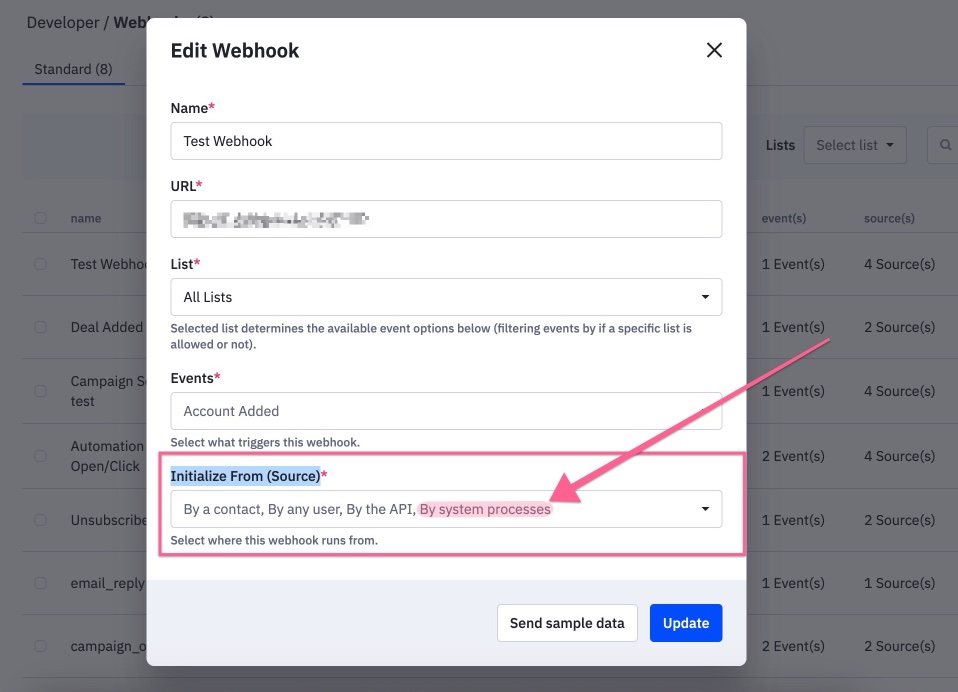
*- 'Automation Driven Campaigns' will trigger webhooks when "By system processes" is selected for the webhook setting 'Initialize From (Source)'example:
Custom webhook headers
Custom webhook headers let you include authentication credentials or integration-specific metadata with every request sent by a webhook. For a standard header, value is sent unchanged. If is_signature is true, the value is used as a secret to generate an HMAC-SHA256 signature from the webhook request body; the generated signature is sent as the header value. This allows the receiving service to verify that the payload originated from ActiveCampaign and was not modified in transit.
Validation
- Each header must include a non-empty
name. - A header
namecannot exceed 255 characters. - Header names must be unique within the webhook.
- Each standard header must include a non-empty
value. - Only one header can have
is_signatureset totrue. - A new signature header must include a non-empty
valueto use as its signing secret. - When updating an existing signature header, an empty value preserves the current signing secret. Provide a new value to replace it.
- Invalid headers cause the request to fail with HTTP
422. The response containsWebhook headers validation failedand field-specific errors such asheaders.0.nameorheaders.1.is_signature.
When headers is included in an update request, it represents the complete desired header set: existing headers omitted from the array are removed. Use an empty array to remove all headers, or omit headers to leave the existing headers unchanged.